
Share post:


TABLE OF CONTENTS
See Virtru In Action
Share post:
/blog%20-%20Save%20Secure%20Share%20Protected%20Files%20Directly%20to%20Google%20Drive%20and%20Microsoft/csecure-share-cloud-save-blog.jpg)
Protected files can now go straight where your work happens. With Virtru Secure Share's latest update, recipients can save shared files directly to Google Drive and Microsoft OneDrive, SharePoint, and Teams, right from the Secure Share interface.
This new integration feature brings your secure collaboration workflow full circle, connecting protected sharing with the cloud platforms your teams use every day.
What’s New? Key Features & Benefits
Direct Cloud Saves
When someone shares a protected file with you, you'll see new upload options alongside the standard "Download All" button.
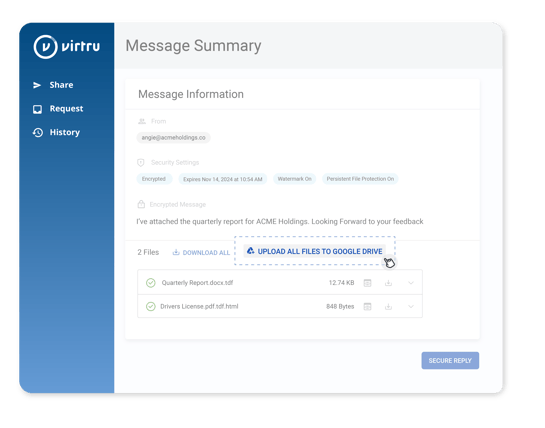
Choose "Upload to Google Drive" or "Upload to OneDrive/SharePoint" to send files straight to your cloud storage—keeping your workflow smooth and your desktop clutter-free.
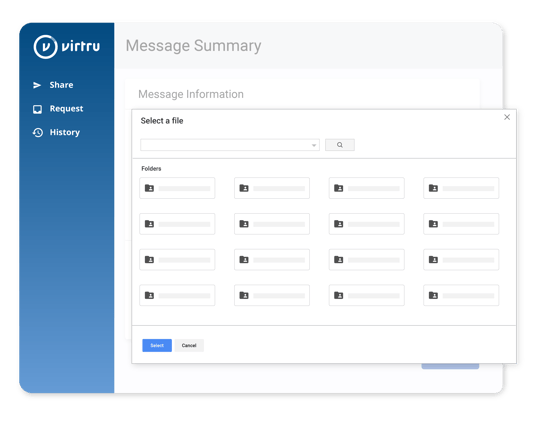
Flexible Administrative Controls
IT administrators can now configure exactly how users save shared files:
- Enable Google Drive, Microsoft cloud storage, local downloads—or any combination
- Disable local downloads entirely to keep sensitive files within approved cloud environments
- Set organization-wide policies that match your security requirements
Security That Follows Your Files
Your security controls travel with your data, no matter where it's saved:
- Files with Persistent File Protection automatically convert to HTML files with secure view links
- Expiration dates, watermarks, and access controls remain enforced across all storage destinations
- Download restrictions for watermarked files stay intact, regardless of the sharing method
Why This Matters
This update gives teams even more flexibility in how they work with protected files. Secure Share empowers you to request and collect sensitive data directly into the apps where you’re already working: whether that’s Google Drive or Microsoft OneDrive, SharePoint, and Teams. The request workflow lets you gather information from outside of your org and save it directly to your existing cloud storage applications, while maintaining the same security controls you trust.
For organizations with strict data governance requirements, the ability to restrict local downloads while enabling cloud storage saving offers a powerful new way to prevent data sprawl while maintaining productivity.
Completing the Secure Collaboration Circle: Inbound and Outbound Workflows Now Available
This new inbound capability rounds out our existing outbound Secure Share integration workflow, where you can already share files directly from Microsoft OneDrive, Sharepoint and Teams & Google Drive. With our existing outbound workflow, you can already:
- Select and share files directly from Google Drive and MicrosoftOneDrive, SharePoint, and Teams through Secure Share
- Upload files to Secure Share from your cloud storage without manual downloads and re-uploads
- Apply Virtru's encryption and access controls to files shared externally from your preferred platforms
Now with direct cloud saves for recipients, we've further closed the secure collaboration loop.
Share protected files out from your cloud storage, and receive protected files back into the same platforms, all while maintaining consistent security controls throughout the entire workflow.
Getting Started
Ready to configure these new storage options for your organization? Contact your Customer Success Manager or visit our Support Center for setup guidance.
Learn more about how Virtru Secure Share streamlines secure collaboration for your team.
Editorial Team
The editorial team consists of Virtru brand experts, content editors, and vetted field authorities. We ensure quality, accuracy, and integrity through robust editorial oversight, review, and optimization of content from trusted sources, including use of generative AI tools.
View more posts by Editorial TeamSign Up for the Virtru Newsletter
/2026%20BLOG/26-Blog-Protecting%20Patient%20Trust.webp)
FROZEN -- Protecting Patient Trust: How NHS Leaders Can Enforce Policy Automatically
/blog%20-%20FIPS140-3/Virtru-FIPS1403.webp)
FROZEN -- FIPS 140-3 Is the New Standard for Cryptographic Validation. Here Is What That Means for Your Data.
/blog%20-%20rocket.chat/Virtru-rocketchat-blog.webp)
FROZEN -- Security Proven, Not Promised: How RocketChat and Virtru Enable Continuous Access Control
/blog%20-%20security%20triad/triad-blog.webp)
The Modern AI Security Triad
/blog%20-%20zero%20trust%20security,%20journey%20ends%20at%20the%20data/Zero-Trust-Peppo.png)
Zero Trust Security: The Journey Ends at the Data
/blog%20-%20Cymphony/cymphony-ai-workforce.webp)
Cymphony, AI Agents, and the Case for Security That Travels With Data

Nikesh Arora Is Right: It’s Time to Rethink Your Cyber Security Architecture

IBM’s Breach Report Makes the Case for Object-Level Data Security

FROZEN -- Should You Go Against the Flow? Virtru vs. FlowCrypt PGP Encryption

The DoD SAFE Alternative Your Team Will Actually Use