Share post:


TABLE OF CONTENTS
See Virtru In Action
Share post:
Securely share, store, and collaborate on sensitive files with external partners, contractors, and vendors — without losing control. Virtru Collaborate is purpose-built for ongoing external collaboration, with secure workspaces that keep every file under your control across the full life of a project or relationship. Virtru Collaborate closes the gap that emerges when sensitive files leave your environment, turning external sharing into governed, auditable collaboration.
- Governed workspaces: Create on demand, compliant environments for storing and collaborating on sensitive files, with TDF protection applied to every file automatically.
- Designed for regulated industries: Built on Virtru's FedRAMP Moderate authorized, FIPS 140-2 validated architecture, engineered to support CMMC, ITAR, HIPAA, and other stringent regulatory frameworks.
- Ongoing access control: Manage, modify, and revoke access at any time, even after files have been shared.
- Complete auditability: Per-file audit trails extend beyond your environment, giving you the documentation required for CMMC, ITAR, HIPAA, and more.
- Seamless external access via browser: No software or account setup required for external collaborators, so onboarding external parties takes minutes, not days.
- A complement to your existing apps: Works alongside Google Drive, Microsoft OneDrive, and SharePoint as the secure external collaboration component, so internal systems stay internal.
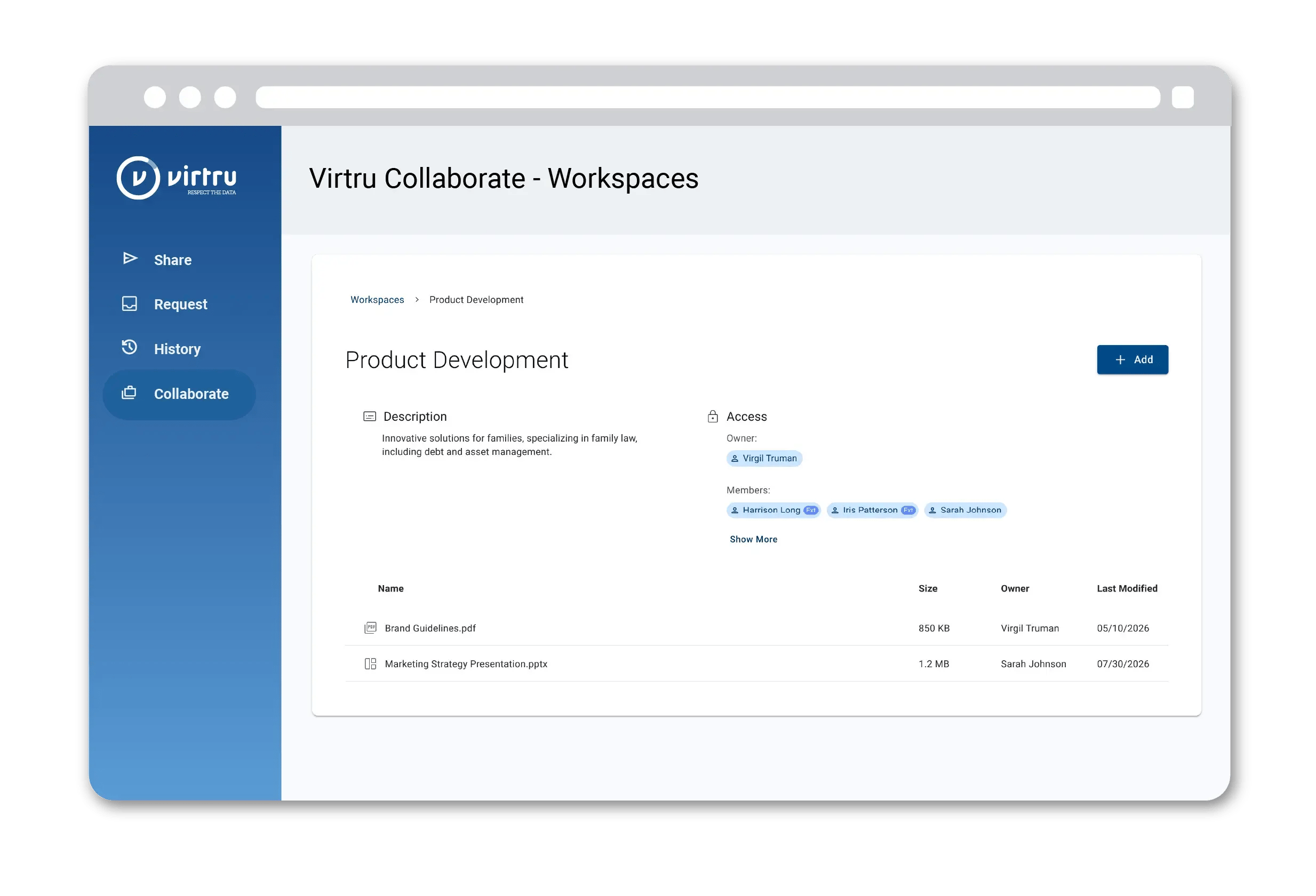
Getting started with Virtru Collaborate is straightforward. Create a new secure workspace instantly, then configure permissions, invite recipients, and add files. Files can be uploaded from your desktop, or pulled directly from Google Drive, Microsoft OneDrive, or SharePoint. Each workspace is only accessible to those invited to it. This makes it easy to manage multiple workspaces for different contractors, projects, or partner engagements, each with their own tailored access and permissions.
When added to a workspace, external recipients receive an email with a direct link to access it. They verify their identity using their existing email address, no guest accounts or new usernames required. Administrators manage permissions, monitor activity, and modify access from the Control Center dashboard in seconds.
Virtru Collaborate gives your organization the confidence to share sensitive files with external parties while keeping data both protected and productive — because security should empower collaboration, not stifle it.
Visit the Virtru Collaborate page or our Support Center to learn more, or reach out to your Virtru representative to get started.
Virtru Product Marketing
The Virtru product marketing team is focused on improving and delivering Virtru’s data centric security offerings to customers. Their human-centric approach, backed by research and data, informs messaging and campaigns that effectively educate the cybersecurity community.
View more posts by Virtru Product MarketingSign Up for the Virtru Newsletter


/General%20Newsletter%20Images/secureshare-NL-FINAL.png)
-May-28-2025-06-22-56-2800-PM.jpg)