Share post:


TABLE OF CONTENTS
See Virtru In Action
Share post:
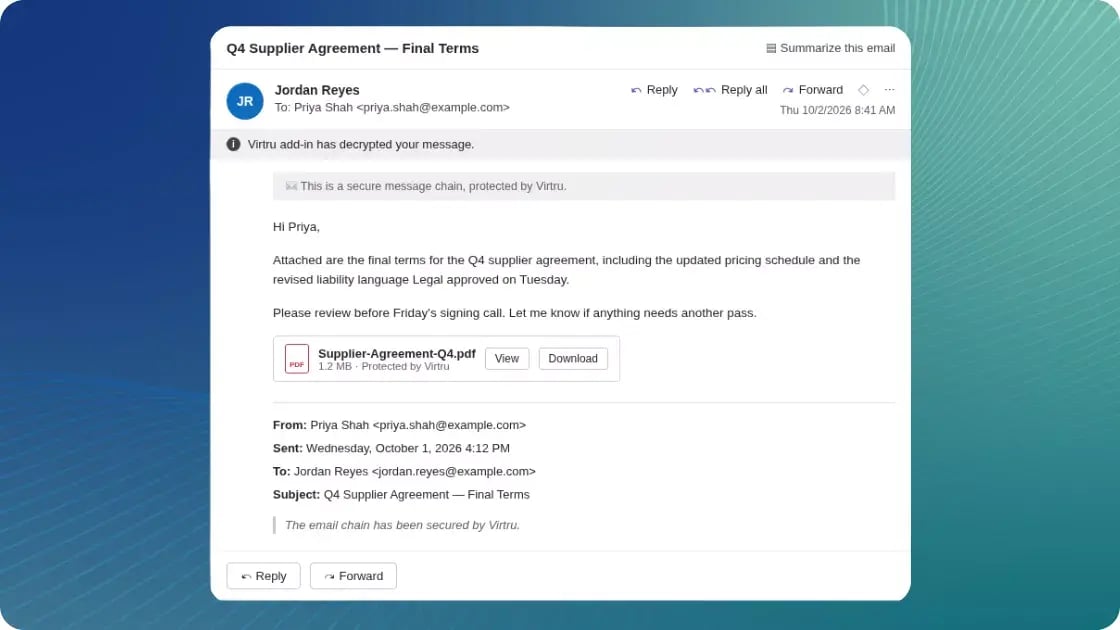
Protected email should be as easy to read as any other message. With Virtru Email for Microsoft Outlook, encrypted emails decrypt automatically and appear right in the Outlook reading pane. You don't need to open the Virtru side panel or launch Secure Reader: select the message and read it. The protection stays with the message, and the experience matches everything else in your inbox.
-
Read protected email instantly in the reading pane, with a clear banner confirming the message is secured by Virtru
-
Access protected attachments in the message body, with View and Download options and persistent protection and watermarking still applied
-
Keep conversations protected with replies and forwards that are encrypted by default, confirmed by a simple notification instead of a pop-up
-
Stay in control after you send, with revoke, expiration and forwarding controls available from the Virtru side panel, including in your Sent folder
Inline Decryption is ideal for organizations where protected email is part of everyday work. When reading secure messages takes no extra effort, users stop looking for workarounds, and more sensitive information stays protected. Security teams keep every policy in place, and users get an inbox that just works.
Inline Decryption is available in Outlook on the web (OWA) and New Outlook for Windows. Classic Outlook for Windows, Outlook for Mac, and Outlook for iOS and Android continue to use the Virtru side panel. Administrators need to deploy the updated add-in manifest to turn on Inline Decryption.
To learn more, visit our Support Center.
Visit our Virtru Email for Microsoft Outlook page to learn more about how Virtru makes it easy to protect sensitive emails and attachments without changing your workflow.
Virtru Product Marketing
The Virtru product marketing team is focused on improving and delivering Virtru’s data centric security offerings to customers. Their human-centric approach, backed by research and data, informs messaging and campaigns that effectively educate the cybersecurity community.
View more posts by Virtru Product MarketingSign Up for the Virtru Newsletter