
Share post:


TABLE OF CONTENTS
See Virtru In Action
Share post:

For defense contractors pursuing CMMC Level 2 compliance, a migration to Microsoft GCC High is often positioned as the gold standard. It provides a robust, locked-down environment designed specifically for the Defense Industrial Base (DIB). However, once you are settled inside that secure enclave, a new challenge often emerges: How do you collaborate with the outside world?
While GCC High is excellent for protecting data at rest internally, secure external collaboration can be a major friction point.
This is where Virtru comes in. While many organizations use Virtru as a compliant alternative to GCC High on Commercial Cloud, a growing number of DIB companies are using Virtru with GCC High to enable simple, secure CUI sharing.
The GCC High "Island" Makes External Sharing Hard
Microsoft GCC High is designed to be isolated. While this is great for security, it creates hurdles when you need to share Controlled Unclassified Information (CUI) with partners, suppliers, or customers who aren’t on GCC High. Native external sharing features in GCC High can be restrictive, complex to configure, and frustrating for recipients who don't have a matching government cloud identity.
This is why one of the largest shipbuilders for the U.S. military uses Virtru Secure Share: They have an expertly configured GCC High environment, but they still need the ability to exchange CUI files with external parties. With Virtru Secure Share, their teams can collaborate confidently and securely — all the while keeping CUI in a FedRAMP authorized location — and enforcing granular policy and access control.
Defense contractors shouldn't have to choose between compliance and collaboration. These teams need a way to share CUI with GCC High that is frictionless for the sender and easy for the recipient.
Virtru + GCC High: FedRAMP for CUI, Everywhere It Moves
Virtru is a seamless complement to your Microsoft environment, regardless of whether you are on Commercial Cloud, MS365 Business Premium, or GCC High. By adding Virtru Secure Share to your tech stack, you gain a purpose-built tool for CMMC-compliant file sharing that satisfies DoD requirements without breaking your workflow — or breaking the bank.
Here is how Virtru enhances the GCC High experience:
1. A FedRAMP Authorized Secure Container
When you share a file via Virtru Secure Share, that data object is wrapped in the Trusted Data Format (TDF). This is an open standard embraced by the DoD, IC, and many allied nations.
- The data is wrapped in FIPS 140-3 validated encryption.*
- Virtru-protected files are stored in Virtru’s FedRAMP Moderate Authorized environment — never exposed to the open internet or a non-compliant cloud environment.
2. Simplified External Collaboration
Unlike native GCC High sharing, which often forces external recipients to jump through hoops, Virtru provides a seamless experience. You can send encrypted CUI to partners or DoD contacts. The recipient does not need GCC High, nor do they need to install software to access the secure file. They simply authenticate with their Microsoft or Google credentials, using their preferred browser.
"We currently use GCC High, but we have it enclosed, meaning that only our employees can have access to company information," one security leader said. "We purposely prevent the ability to share information outside our organization, but we do have instances where we do need to share large files outside the company."
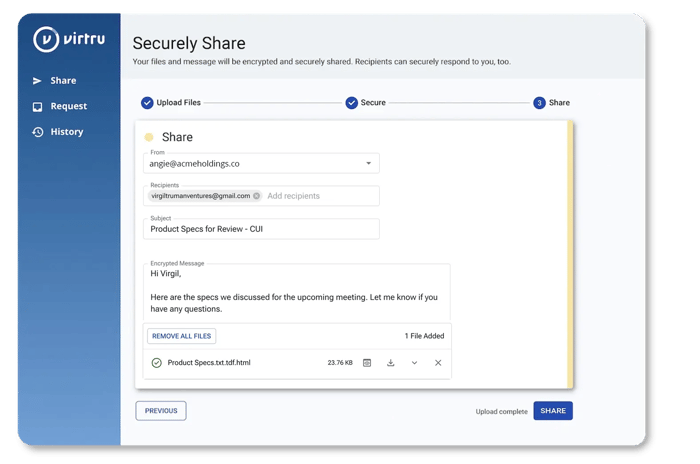
This use case is common in the DIB: Even after deploying GCC High, organizations find that external collaboration is cumbersome and introduces hurdles. Virtru fills the gap with a critical missing piece: The ability to safely share CUI externally.
How Virtru Supports Your CMMC Strategy
Even within a robust GCC High environment, you are responsible for the flow of CUI. Virtru supports 27 of the 110 CMMC Level 2 controls, acting as a vital layer of defense for data in transit.
- DFARS 7012 Compliance: Virtru’s cryptographic controls and incident reporting practices facilitate compliance with DFARS 7012.
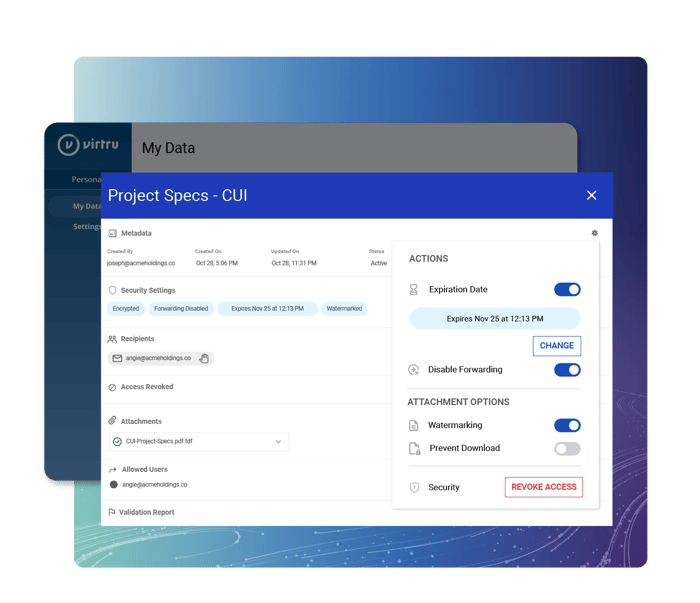
- Granular Access Controls: You maintain ownership of the data even after it leaves your GCC High environment. You can revoke access, disable forwarding, and see exactly when a file was opened.
- Audit Ready: Virtru provides the detailed logging required for CMMC assessments, proving exactly who accessed CUI and when.
The Technical Details: Files as Links
To ensure maximum security and separation, files shared via Virtru are not sent as traditional email attachments. Rather, they are stored in a FedRAMP authorized environment and accessed via a weblink — only after the recipient authenticates with their credentials.
- The Upload: When you upload a file to Virtru Secure Share, the file is encrypted and uploaded to Virtru’s FedRAMP Moderate Authorized secure storage.
- The Delivery: The recipient receives a secure link, not the file itself.
- The Access: To view the file, the recipient must authenticate. The data is decrypted locally on their device, ensuring that only authorized parties can see the CUI.
This method ensures that while you utilize the robust architecture of GCC High for your internal systems, your external CMMC file sharing utilizes a purpose-built, FedRAMP Authorized encrypted tunnel.
Don't Let Compliance Slow You Down
Migrating to GCC High is a significant investment in your company’s cybersecurity posture. Don’t let that investment become a bottleneck for business operations. By pairing Virtru with Microsoft GCC High, you ensure that your data remains locked down, but your business keeps moving forward.
Interested in learning how Virtru can streamline your GCC High CUI sharing workflows? Contact our team for a demo today.
Editorial Team
The editorial team consists of Virtru brand experts, content editors, and vetted field authorities. We ensure quality, accuracy, and integrity through robust editorial oversight, review, and optimization of content from trusted sources, including use of generative AI tools.
View more posts by Editorial TeamSign Up for the Virtru Newsletter
/2026%20BLOG/26-Blog-Protecting%20Patient%20Trust.webp)
FROZEN -- Protecting Patient Trust: How NHS Leaders Can Enforce Policy Automatically
/blog%20-%20FIPS140-3/Virtru-FIPS1403.webp)
FROZEN -- FIPS 140-3 Is the New Standard for Cryptographic Validation. Here Is What That Means for Your Data.
/blog%20-%20rocket.chat/Virtru-rocketchat-blog.webp)
FROZEN -- Security Proven, Not Promised: How RocketChat and Virtru Enable Continuous Access Control
/blog%20-%20security%20triad/triad-blog.webp)
The Modern AI Security Triad
/blog%20-%20zero%20trust%20security,%20journey%20ends%20at%20the%20data/Zero-Trust-Peppo.png)
Zero Trust Security: The Journey Ends at the Data
/blog%20-%20Cymphony/cymphony-ai-workforce.webp)
Cymphony, AI Agents, and the Case for Security That Travels With Data

Nikesh Arora Is Right: It’s Time to Rethink Your Cyber Security Architecture

IBM’s Breach Report Makes the Case for Object-Level Data Security

FROZEN -- Should You Go Against the Flow? Virtru vs. FlowCrypt PGP Encryption

The DoD SAFE Alternative Your Team Will Actually Use