
Share post:


TABLE OF CONTENTS
See Virtru In Action
Share post:

Sending an email by mistake can be a nerve-wracking experience — especially if that email ends up as a permanent record. If you’ve ever wondered how to recall an email in Outlook, you’re not alone. Although Outlook’s native recall feature exists, its limitations have led many to search for more robust solutions. This post explores both the built-in functionality in Microsoft Outlook, as well as how Virtru for Outlook provides a superior alternative for managing your emails across all platforms.
Outlook’s Native Email Recall Feature
Outlook has offered a native recall function for years, but that functionality is limited. There are important caveats to keep in mind:
- Native recall only works if both sender and recipient are using the Outlook desktop client on the same Microsoft Exchange server. That means that it can only be applied to internal emails with users at your organization, using the same email server.
- The feature only affects unread messages—if the recipient has already opened the email, the recall may fail.
- Recipients can disable the automatic processing of recall requests, rendering this feature ineffective in many cases.
In short, you can't use Outlook's recall feature for emails sent to anyone outside your organization. So, if you or one of your teammates sends a sensitive file to a customer or a partner — or to the wrong recipient outside your organization — the native Outlook email recall will not work.
How to Recall an Email in Outlook Using the Built-In Feature
Here's how Microsoft Support lays out the steps for recalling or resending an Outlook message.-
Select "Sent Items."
-
Select or double-click the message so it opens in another window.
-
Select File > Info.
-
Select Resend or Recall and select one of the two options.
-
Select Recall This Message... to delete or replace a sent message.
-
Select Resend This Message... to send a message again with the option to update content or change recipients.
-
-
Select the Tell me if recall succeeds or fails for each recipient check box.
-
Select OK.
While these steps outline how to recall an email in Outlook, the strict requirements and conditional nature of the feature often leave users searching for more dependable approaches for a wider variety of scenarios. Virtru lets you recall Outlook emails and attachments any time, even after they've left your organization, and even if the attachments have already been opened.
How to Recall an Outlook Email with Virtru
If you sent your email with Virtru, you can easily recall it, or change access permissions any way you choose.
- Locate the email in your "Sent" folder
- Select the Virtru toggle in Outlook
- Click the "Revoke Access" button with the hand icon.
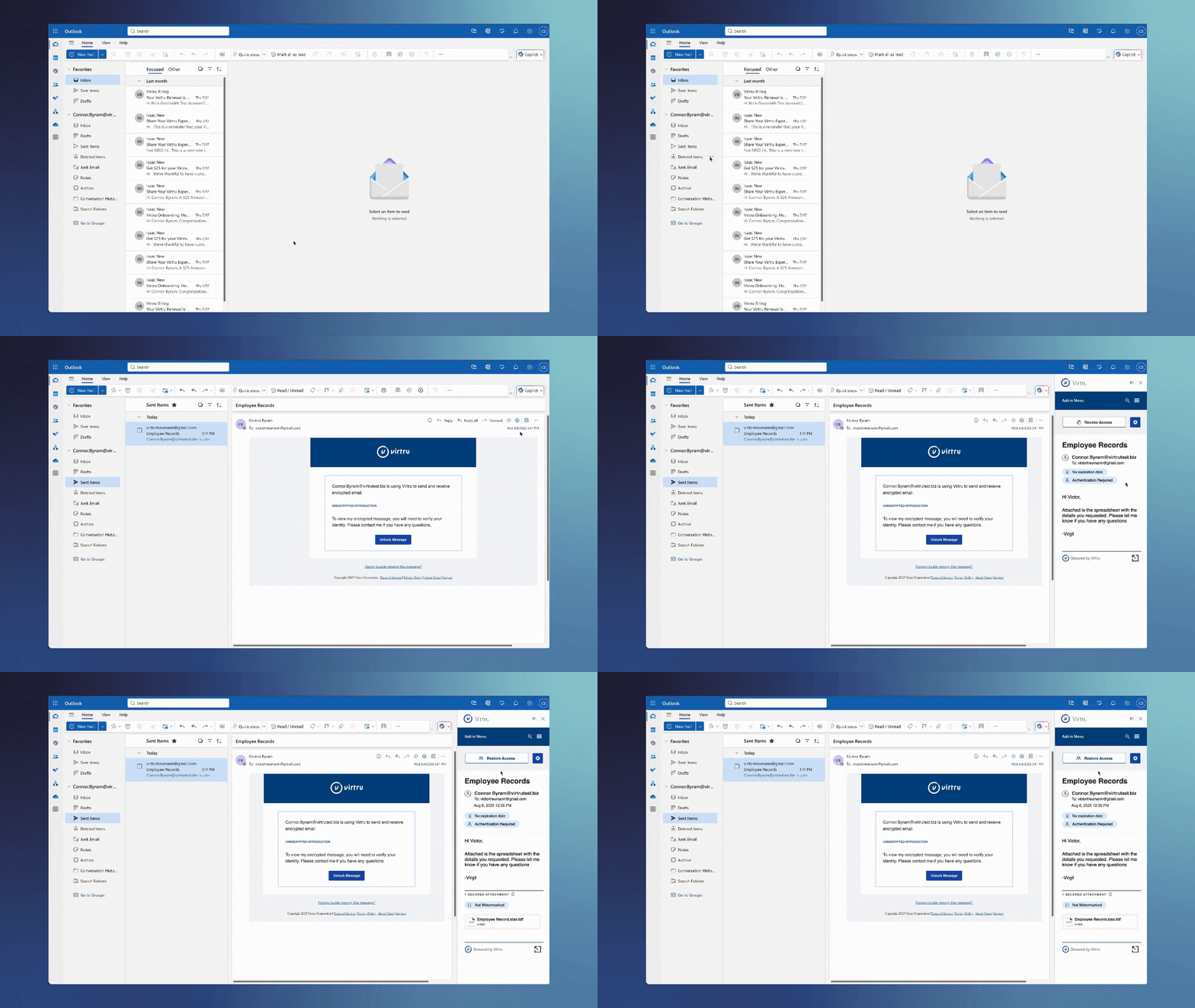
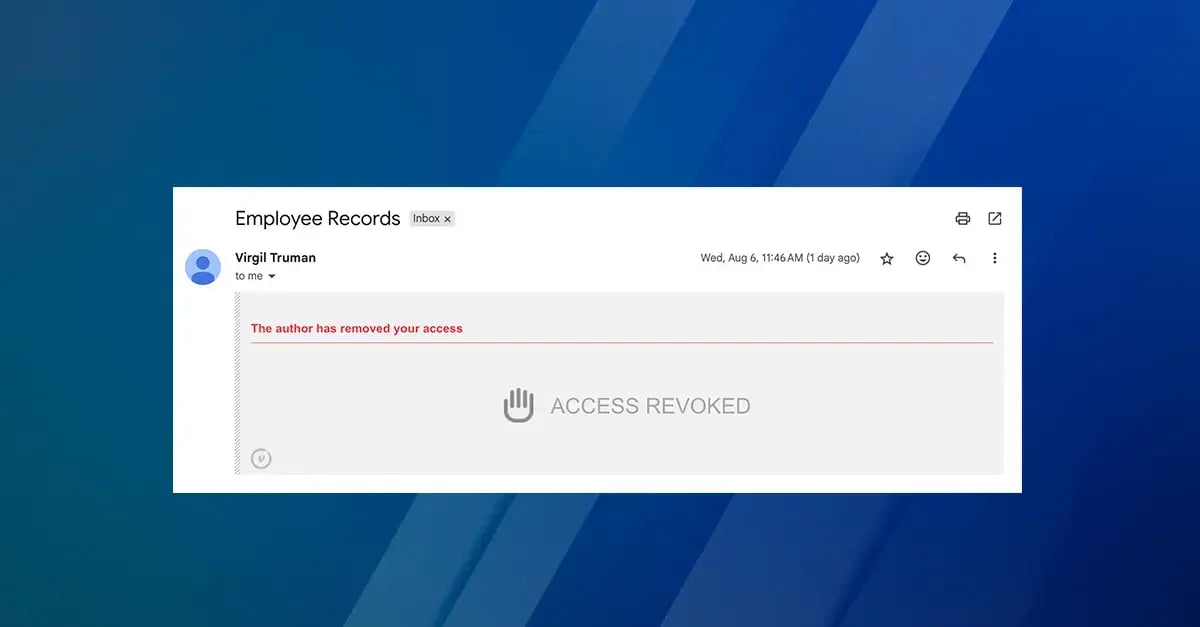
And that's it - the recipient will no longer be able to access the email or file that has been sent to them. They will still have an email in their inbox, but the content will not be accessible. It will look like this:
How Admins Can Revoke Outlook Emails with Virtru
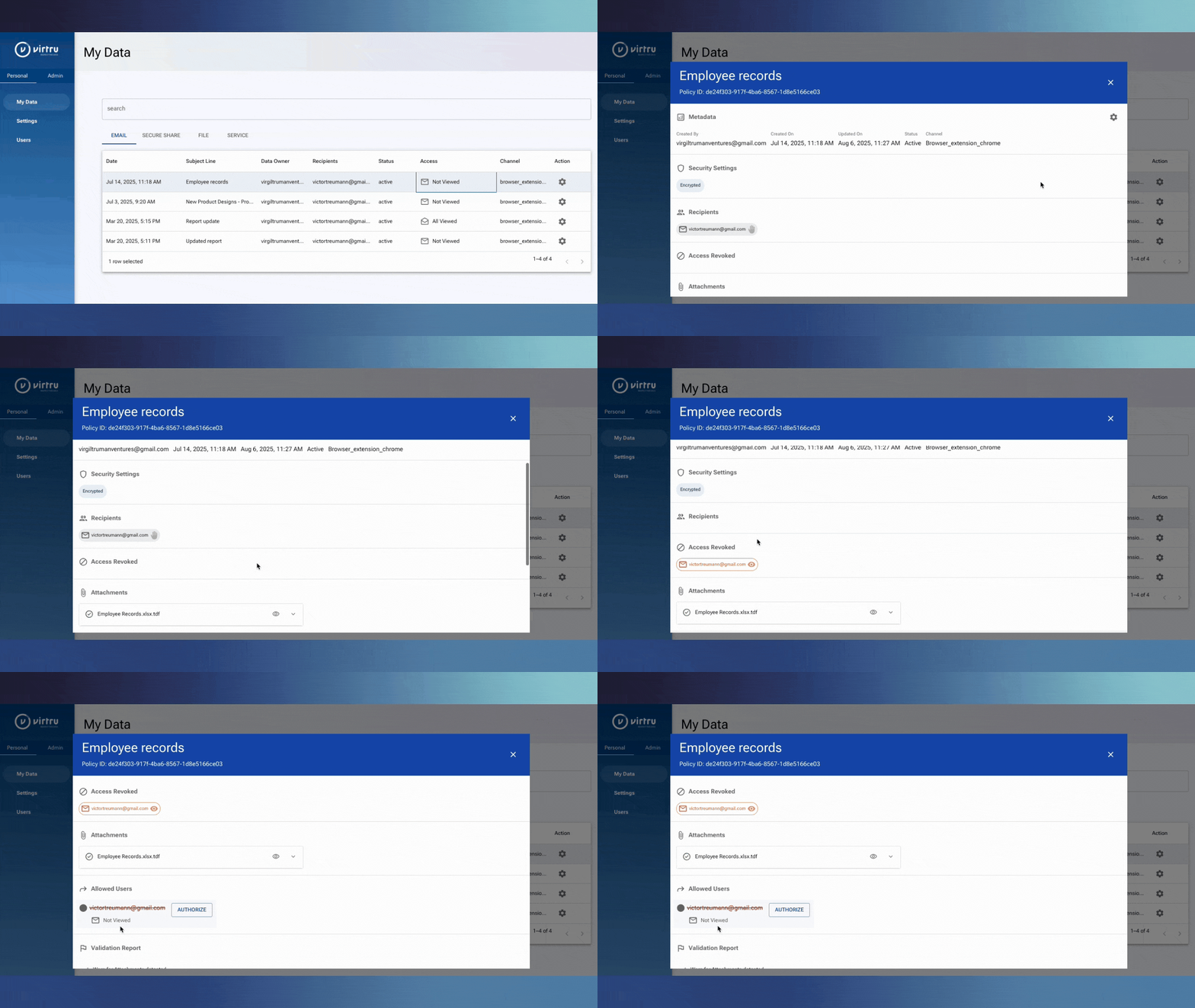
Users and admins can also revoke Outlook emails from the Virtru Control Center, where the process is very similar, shown below. This is also how users of the Virtru Data Protection Gateway can revoke messages if they do not have Virtru's client-side email encryption in their mail client.
- Log into the Virtru Control Center.
- Choose the email or file you'd like to recall.
- Click the "Revoke Access" button with the hand icon.
Virtru: Advanced Email Recall and Data Protection for Outlook
For organizations and professionals who need reliable control over sensitive communications, Virtru offers a modern solution that goes beyond Microsoft Outlook’s limits.
Here’s why Virtru is the best answer to the question, “How do I recall an email in Outlook?”
- Seamless, Platform-Agnostic Integration: With Virtru for Microsoft Outlook, you can send secure emails from the Outlook desktop, web, and mobile platforms. Virtru integrates directly into Microsoft Outlook and supports other Microsoft apps (including SharePoint, OneDrive, and Teams), ensuring that your encryption and control features extend throughout your digital workplace.
- Immediate Revocation of Email or File Access: If an email is sent with Virtru protection enabled, you can revoke access at any time—even after the message has been read. Simply locate the email in “Sent Items” and click the hand-shaped “Revoke Message” icon. This powerful feature answers the need for recalling an email in Outlook that native functionality simply cannot match.
- Invisible, Domain-Wide Protection with Virtru Gateway: For organizations that require seamless implementation, the Virtru Data Protection Gateway can be set up behind the scenes. This means all outbound Outlook emails are automatically encrypted and protected without disrupting everyday workflow or requiring end-users to make manual changes.
- Granular Messaging Controls: In addition to recall, Virtru provides advanced options like “Disable Forwarding” to prevent unauthorized sharing, and you can set an expiration date to ensure sensitive information doesn't remain accessible indefinitely in the recipient's inbox. These features give IT and security leaders the robust controls necessary to meet strict data protection policies and regulatory requirements.
Why Virtru Is Your Best Option for Secure Email, With No Regrets
How to recall an email in Outlook using native features might be a common question, but the real world demands a more comprehensive approach. If your email is critical — for example, if it contains sensitive data, confidential client information, or potentially damaging errors like credentials or financial information — Virtru’s enhanced encryption and recall capabilities give you the control and confidence you need to keep business moving without friction (or regrets).
Whether you’re an executive, a security leader, or an everyday user, Virtru’s easy-to-use solution for Microsoft Outlook ensures that one mis-sent email doesn’t become a long-term liability. With seamless integration across all Microsoft apps and platforms, Virtru delivers enterprise-grade security that empowers you with complete email control. Contact our team today for a demo to see how it can seamlessly protect your sensitive business communications.
Editorial Team
The editorial team consists of Virtru brand experts, content editors, and vetted field authorities. We ensure quality, accuracy, and integrity through robust editorial oversight, review, and optimization of content from trusted sources, including use of generative AI tools.
View more posts by Editorial TeamSign Up for the Virtru Newsletter
/2026%20BLOG/26-Blog-Protecting%20Patient%20Trust.webp)
FROZEN -- Protecting Patient Trust: How NHS Leaders Can Enforce Policy Automatically
/blog%20-%20FIPS140-3/Virtru-FIPS1403.webp)
FROZEN -- FIPS 140-3 Is the New Standard for Cryptographic Validation. Here Is What That Means for Your Data.
/blog%20-%20rocket.chat/Virtru-rocketchat-blog.webp)
FROZEN -- Security Proven, Not Promised: How RocketChat and Virtru Enable Continuous Access Control
/blog%20-%20security%20triad/triad-blog.webp)
The Modern AI Security Triad
/blog%20-%20zero%20trust%20security,%20journey%20ends%20at%20the%20data/Zero-Trust-Peppo.png)
Zero Trust Security: The Journey Ends at the Data
/blog%20-%20Cymphony/cymphony-ai-workforce.webp)
Cymphony, AI Agents, and the Case for Security That Travels With Data

Nikesh Arora Is Right: It’s Time to Rethink Your Cyber Security Architecture

IBM’s Breach Report Makes the Case for Object-Level Data Security

FROZEN -- Should You Go Against the Flow? Virtru vs. FlowCrypt PGP Encryption

The DoD SAFE Alternative Your Team Will Actually Use