
Share post:


TABLE OF CONTENTS
See Virtru In Action
Share post:
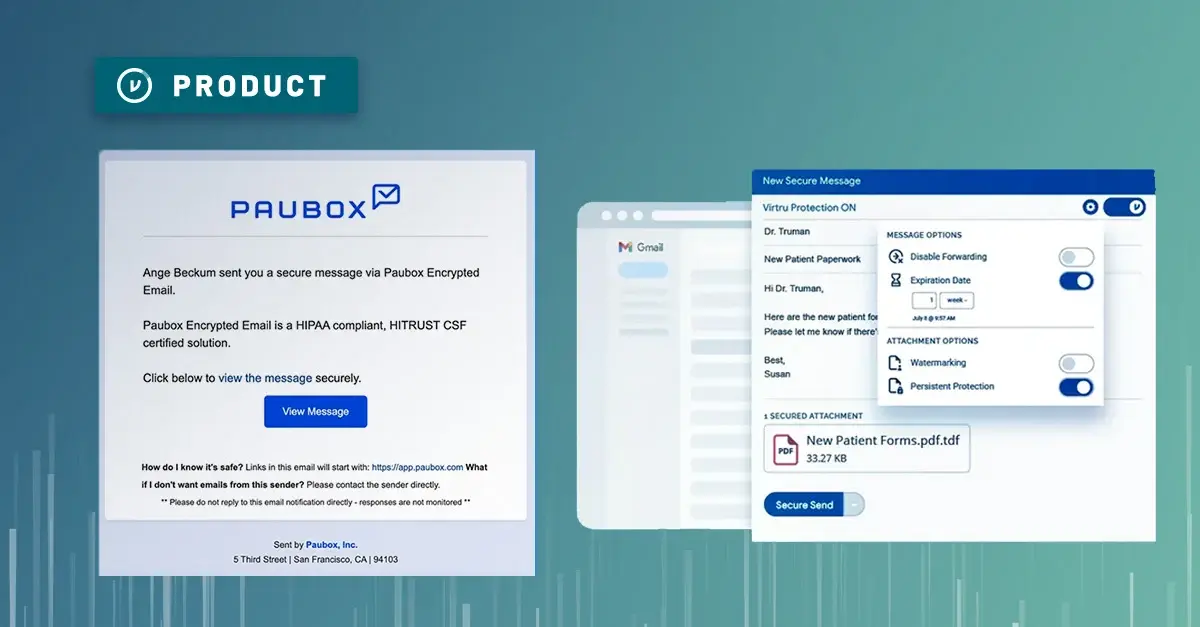
If you’re looking for an email encryption solution, you’ll find no shortage of vendors out there. But the devil is in the details: Not all email encryption is created equal — and these solutions vary widely in their strength and versatility.
In this post, we’ll break down some of the key differences between Paubox and Virtru - and how one is a checkbox for compliance, whereas the other is security that genuinely protects sensitive data both in transit and at rest.
Virtru: Email and File Encryption that Travels with the Data, Forever
Whereas some encryption solutions only protect data on its way to its destination, Virtru security stays with the data even after it reaches its destination — and lets you revoke or change access permissions at any time.
Virtru is fast to deploy, easy to use, and supports the world’s strictest compliance regulations, including HIPAA, ITAR, CMMC, CJIS, and GLBA. Virtru can be deployed across your team in minutes, whether you use Gmail, Outlook, or both.
Because it’s deployed as a Chrome browser extension or an Outlook add-in, it’s remarkably simple for admins to get Virtru up and running. Virtru does not require you to stand up an email gateway, but it does offer a gateway option if you want to apply a layer of automated security for server-side protection that’s invisible to the user — or if you want to protect the data that moves in and out of other SaaS apps like Salesforce.
/Virtru%20for%20Gmail%20HIPAA-01.webp?width=1000&height=600&name=Virtru%20for%20Gmail%20HIPAA-01.webp)
Virtru Encryption Method: End-to-End Encryption at the Object Level, Client-Side or Server-Side
Virtru applies end-to-end encryption to data, meaning that your sensitive information is protected from the moment it’s created or uploaded, through transit, and at rest at its destination. This is more comprehensive protection than TLS (transport layer security), which only protects data in transit, not at rest once it has arrived at its destination. Whereas TLS provides a secure “tunnel” through which data can travel safely to its destination, it does not provide any protection for the data once it arrives in the recipient’s inbox. Once the email has left your network, it’s gone.
Thanks to Virtru’s technology, built on the Trusted Data Format, your encrypted information remains fully under your control, even after it’s left your organization. You can revoke or change access permissions any time you choose — so if, for example, a nurse accidentally emails a medical record to the wrong person, the nurse or an admin can revoke access immediately to protect your patient’s privacy.
Virtru’s email plugins apply client-side encryption, meaning that the encryption happens in the email client, rather than when it hits your server. Virtru encryption is also applied at the object level, protecting every email and file with its own distinct “wrapper” of protection and access control that stays with the data through its entire life cycle.
Here's a video that shows how Virtru works.
Virtru Features: DLP, Flexible Key Management, Large File Transfer, FedRAMP-Authorized
Virtru provides several advanced features for email encryption, including:
- Revoke email and file access at any time (especially valuable if an email is sent to the wrong person).
- Set expiration date (e.g., make an email or file available for 1 week).
- Prevent forwarding and restrict downloading with persistent protection.
- Custom branding, allowing you to put your own logo and branding on the recipient email experience, reducing any confusion for patients, customers, and external partners.
- Flexible encryption key management (host your keys on-premises or in a public or private cloud with Virtru Private Keystore for advanced control and compliance).
- FedRAMP-authorized encryption technology for compliance with the world’s strictest regulations. Virtru’s Data Security Platform is also FIPS 140-3 compliant.
- HITRUST equivalent security: While Virtru is not HITRUST Certified, its data security practices are tightly aligned with HITRUST standards, as HITRUST bases its requirements on the NIST SP 800-53 controls required for FedRAMP authorization. More details can be found in the Virtru Trust Center.
- Large file transfer up to 15 GB with Virtru Secure Share, which can be used in any browser.
Virtru Customer Base: All Sizes and Industries
Virtru serves more than 6,700 customers around the world, from the world’s largest banks to small medical practices, from federal government agencies to rural K-12 schools. Customers choose Virtru because it blends ease of use with powerful security that fits a wide range of data sharing scenarios. Admins love it because it’s fast to deploy, intuitive for users and recipients alike, and requires minimal support.
"Just having data encrypted point-to-point [with TLS] doesn't solve the problem. If that's all it took, then Gmail, Google Workspace, and Office 365 would be sufficient. The real issue is, ‘What do you do when you send PHI to the wrong person?’ Virtru is a minimal expense for the security and safety it provides.”
-Jason Karn, Chief Compliance Officer, Total HIPAA
Paubox: TLS Encryption Gateway for All Email Traffic
Paubox encryption is designed specifically for HIPAA compliance, and is most frequently used by small to midsize healthcare organizations.
Paubox Encryption Method: Transport Layer Security (TLS), Server-Side Gateway
Paubox is deployed as an email gateway, which encrypts all outbound email with TLS (transport layer security), regardless of the email's contents. This merely protects information in transit to its destination, but does not provide any encryption at rest once the emails or files reach their destination. Anything sitting in your inbox or your recipients' inboxes will be unencrypted at rest with Paubox.
Paubox is popular because of the user experience when both the sender’s and the recipient’s email clients support TLS encryption. In these cases, it just looks like a regular email. However, this is questionable from a security perspective. That sensitive data is plaintext, unprotected in both your mailbox and your recipient's mailbox. Also - with Paubox, if you send something to the wrong person, that data is gone (with Virtru, you can always revoke).
Paubox piggybacks off of your existing email (Google and Microsoft emails are natively TLS encrypted) and takes action on the 1-2% of emails leaving your environment that may go to recipients that don’t support TLS. They will have a different experience: They will receive a Paubox-branded email that requires the user to click through to view their message, as shown below.

Paubox Features: HIPAA Forms, HITRUST Certified
As mentioned above, Paubox focuses on HIPAA compliance, so its features are geared toward healthcare organizations. Paubox features include:
- TLS encryption for emails in transit — but you have zero control over sensitive data; once it's sent to a third party, it's gone.
- HIPAA compliant forms for websites.
- HIPAA compliant texting for SMS appointment reminders.
- HITRUST certification to demonstrate HIPAA compliance.
- Low cost for small businesses looking to check a box.
Paubox Customer Base: Small to Midsize Healthcare Practices
The Paubox customer base is predominantly small to midsize healthcare practices, like doctor’s offices and dental practices. For larger organizations with varied departments and data security needs, the automatic encryption of all outgoing mail with Paubox will likely become a challenge.
For smaller healthcare practices that want to check the box for HIPAA compliant email and save money, this may be a good option. However, organizations with larger scale, or organizations in need of stronger control and reassurance for files shared externally with patients and partners, may find Paubox's basic features lacking.
Virtru vs. Paubox: Head to Head Comparison
The following chart breaks down the features of Virtru vs. Paubox for email and file security.
|
Feature |
Virtru |
Paubox |
|
HIPAA Compliant |
✅ |
✅ |
|
BAA Provided |
✅ |
✅ |
|
Integration with Outlook and Gmail |
✅ |
✅ |
|
Deploy Without Setting Up a Gateway |
✅ |
|
|
End-to-End Encryption |
✅ |
|
|
Encryption In Transit |
✅ |
✅ |
|
Encryption at Rest (after delivery) |
✅ |
|
|
Client-Side Encryption |
✅ |
|
|
Server-Side Encryption |
✅ |
✅ |
|
Data Loss Prevention (DLP) |
✅ |
|
|
Persistent Access Control |
✅ |
|
|
Revoke Emails and Attachments |
✅ |
|
|
Watermarking |
✅ |
|
|
Expiration Date |
✅ |
|
|
✅ |
||
|
HITRUST Certification |
Equivalent |
✅ |
|
FedRAMP Authorized |
✅ |
|
|
Secure File Transfer |
✅ |
|
|
HIPAA Forms |
Form Collection with Virtru Secure Share |
✅ |
|
Flexible Key Management (SaaS or Self-Hosted) |
✅ |
|
|
Support for additional compliance regulations (ITAR, CJIS, CMMC, GLBA, PCI, etc.) |
✅ |
|
|
Advanced Customer Support |
✅ |
Why Customers Switch from Paubox to Virtru
Here are a few examples from customers who have made the switch from Paubox to Virtru for HIPAA compliant email and file sharing.
Data Accessibility: "With Paubox, there were always issues downloading PHI, having easy access to the PHI folders. There were always issues with the clients not being able to see the folders, or unable to see the documents that we were uploading for them. So, with Virtru, it was night and day." -Karla Soto, Sr. Manager of Pharmacy Operations, Two Point Solutions
Seamless Integration with Their CRM: "Because of the integration with Zoho, it's made things a lot easier. It's enabled us to do a lot more automation that we weren't able to do before with just Paubox as a vendor." -Lily Ditrich, HR Manager, Rescrybe
No Gateway Setup Required: "I'm not seeing any setup [required] for the mail servers or anything, which is exactly what I was looking for — whereas Paubox requires you to get in and change the servers, and you have to get on the domain, and you've got to do this, and you've got to do that." -Owner-Operator, Small Audiology Business
Encryption In Transit and At Rest: "With Paubox, once you send it — sure, you encrypted it via TLS — but it lands somewhere, and you don't know that it's landing somewhere that the data is encrypted at rest. But with your solution, because the email itself is encrypted [end-to-end] with keys, it really is." - Senior IT Director, Biopharmaceutical CompanyAI Gone Awry: "The AI they switched to — I don't like it. I can't train it to deal with what our school's email needs are. Had to set it up to direct to the user's spam folder — otherwise, I was going through 400 quarantine messages per day and the AI wasn't learning whatsoever from when I was clearing messages, or deleting them." - Email Administrator, Education
Choosing the Best HIPAA Email Software for Your Business
Both Virtru and Paubox provide affordable email encryption for HIPAA compliance, with BAAs provided. Because Virtru delivers more robust security capabilities than Paubox, Virtru is more expensive — but it delivers on ROI with fast, simple deployment; world-class support; and a product that is both remarkably simple to use while providing true end-to-end encryption and persistent control over your data, even after it’s left your organization.
If you’ve ever had an employee accidentally send patient PII or PHI to the wrong person, you know how valuable it is to be able to revoke an email that was sent in error. Virtru gives you that peace of mind, so you can maintain trust and persistent control over your organization's data.
Want to explore Virtru for HIPAA email encryption and access control? Contact our team for a demo. We’d love to show you why hundreds of organizations choose Virtru for HIPAA compliance.
Editorial Team
The editorial team consists of Virtru brand experts, content editors, and vetted field authorities. We ensure quality, accuracy, and integrity through robust editorial oversight, review, and optimization of content from trusted sources, including use of generative AI tools.
View more posts by Editorial TeamSign Up for the Virtru Newsletter
/2026%20BLOG/26-Blog-Protecting%20Patient%20Trust.webp)
FROZEN -- Protecting Patient Trust: How NHS Leaders Can Enforce Policy Automatically
/blog%20-%20FIPS140-3/Virtru-FIPS1403.webp)
FROZEN -- FIPS 140-3 Is the New Standard for Cryptographic Validation. Here Is What That Means for Your Data.
/blog%20-%20rocket.chat/Virtru-rocketchat-blog.webp)
FROZEN -- Security Proven, Not Promised: How RocketChat and Virtru Enable Continuous Access Control
/blog%20-%20security%20triad/triad-blog.webp)
The Modern AI Security Triad
/blog%20-%20zero%20trust%20security,%20journey%20ends%20at%20the%20data/Zero-Trust-Peppo.png)
Zero Trust Security: The Journey Ends at the Data
/blog%20-%20Cymphony/cymphony-ai-workforce.webp)
Cymphony, AI Agents, and the Case for Security That Travels With Data

Nikesh Arora Is Right: It’s Time to Rethink Your Cyber Security Architecture

IBM’s Breach Report Makes the Case for Object-Level Data Security

FROZEN -- Should You Go Against the Flow? Virtru vs. FlowCrypt PGP Encryption

The DoD SAFE Alternative Your Team Will Actually Use