
Share post:


TABLE OF CONTENTS
See Virtru In Action
Share post:

Most organizations have some form of email encryption in place. What far fewer realize is that their encryption stops at the email — not the attachment. The file that contains the sensitive data (the contract, the patient record, the financial report) travels onward without protection the moment it's downloaded, forwarded, or saved to a new device.
Understanding how to encrypt email attachments — not just the message — is the difference between security that holds and security that only looks good until something goes wrong.
Why Email Encryption Doesn't Automatically Protect Your Attachments
There are two common forms of email encryption, and neither one fully solves the attachment problem on its own.
TLS (Transport Layer Security) protects email and attachments in transit between servers — usually just for an instant while it's in motion. It's built into most major email providers and operates invisibly — which is useful, but limited. TLS provides no protection once the email is delivered. If a message is forwarded, a server is compromised, or an attachment is saved locally, your file is not protected by TLS.
Standard end-to-end encryption protects the message body from sender to recipient, which is meaningfully stronger. But many implementations don't extend that protection to the attachment itself after it's been saved to a desktop — and none of them give the sender ongoing control over what happens to the file.
That's the gap where data breaches happen. The most sensitive information in most emails isn't the message body — it's what's attached to it. And once that data has left your organization's perimeter, it's incredibly difficult (if not impossible) to claw back.
Recommended Reading: TLS vs. End-to-End Encryption — What's the Difference?
What's at Stake with Unencrypted Attachments
The consequences of unprotected attachments have grown significantly more severe.
According to IBM's 2025 Cost of a Data Breach Report, the average U.S. data breach now costs $10.22 million — an all-time high. Customer PII is the most frequently compromised data type, appearing in 53% of all breaches analyzed. And email remains one of the primary attack vectors: a misdirected email attachment, a forwarded thread, a downloaded file on an unmanaged device — each one is a potential breach with real regulatory exposure.
The regulatory environment has tightened to match. In January 2025, HHS proposed amendments to the HIPAA Security Rule that would transform encryption from an "addressable" specification — meaning organizations could opt out with justification — to an effective requirement for all covered entities and business associates. For healthcare organizations, the question of how to encrypt email attachments is no longer discretionary.
Similar requirements apply under CMMC for defense contractors handling Controlled Unclassified Information (CUI), FedRAMP for cloud services used by federal agencies, and a growing body of state privacy laws now in effect across 20 U.S. states. In each case, the expectation is the same: sensitive data in transit must be protected, and "protected in transit" means the attachment, not just the email wrapper.
How to Encrypt Email Attachments with Virtru
Virtru Email integrates directly into Google Gmail and Microsoft Outlook, adding attachment encryption without changing how your team works. There's no separate portal, no password-protected ZIP files, no friction for recipients.
When you compose a message with Virtru enabled, attachments are encrypted using the Trusted Data Format (TDF) — an open standard that embeds encryption and access policy directly into the file itself. Protection is applied at the source, before the file leaves your environment, and it stays with the file regardless of where it goes next.
Beyond encryption, Virtru for Email lets you apply granular controls to every attachment you send:
- Access controls — specify exactly who can open the file, down to the individual recipient
- Expiration dates — set a time limit after which the file can no longer be accessed
- Watermarks — add visible attribution to help deter unauthorized sharing
- Real-time revocation — change or remove access at any point, even after the email has been delivered and the attachment downloaded
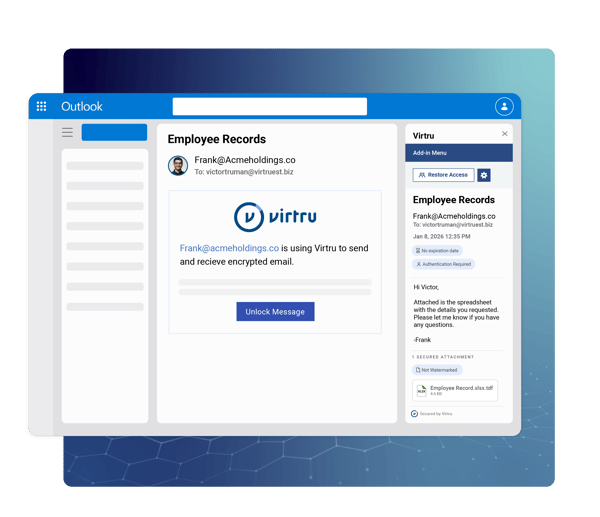
That last capability is where TDF-based encryption fundamentally differs from conventional approaches. Because policy is embedded in the file rather than managed at the email server level, access decisions are enforced at the moment someone attempts to open the file — not at the moment it was sent. An attachment that shouldn't be accessible anymore isn't, regardless of where it has traveled or how many times it was forwarded.
Protection That Travels With the File
The core limitation of most email security tools is that they secure the channel, not the content. Once an attachment clears the perimeter — forwarded externally, downloaded to a personal device, saved to a shared drive — the protection ends.
Virtru's approach is different by design. Because TDF embeds the access policy into the file itself, that policy portability means protection travels with the data through every environment it enters. A recipient opening a protected attachment two weeks later, on a different device, after forwarding the message internally — the access check still runs. If access has been revoked, the file doesn't open.
This is data-centric security applied to one of the most common workflows in any organization: sending a file by email. The encryption isn't attached to the network path. It's attached to the data.
Works Where Your Team Already Works
Virtru for Email doesn't ask your organization to change tools, retrain staff, or adopt a new communication platform. It works within Gmail and Outlook — the email clients your teams use today. Encryption is applied with a toggle; controls are set in a sidebar; recipients access protected files through a straightforward, browser-based flow that requires no software installation.
Security should empower, not stifle. The right attachment encryption solution makes secure behavior the easiest behavior — not an additional step that gets skipped when someone is in a hurry.
For organizations managing compliance requirements, Virtru for Email also maintains comprehensive audit logs of all access attempts and decisions, giving you the visibility you need without manual tracking.
Start Protecting Attachments Today
Email attachment encryption isn't a premium feature reserved for high-security environments. It's the baseline that responsible data handling requires — and with HIPAA amendments, CMMC requirements, and a tightening state privacy landscape, the window for treating it as optional is closing.
Virtru Email is available for Google Gmail and Microsoft Outlook. Integration takes minutes. The protection lasts as long as the data does. To see how it works, contact our team for a demo.
Editorial Team
The editorial team consists of Virtru brand experts, content editors, and vetted field authorities. We ensure quality, accuracy, and integrity through robust editorial oversight, review, and optimization of content from trusted sources, including use of generative AI tools.
View more posts by Editorial TeamSign Up for the Virtru Newsletter

FROZEN -- Securing Employees’ COVID-19 Vaccination and Test Data

Beyond the Sandbox: Keeping Data Protected and AI Agents Productive
/2026%20BLOG/26-Blog-Protecting%20Patient%20Trust.webp)
Protecting Patient Trust: How NHS Leaders Can Enforce Policy Automatically
/blog%20-%20FIPS140-3/Virtru-FIPS1403.webp)
FIPS 140-3 Is the New Standard for Cryptographic Validation. Here Is What That Means for Your Data.
/blog%20-%20rocket.chat/Virtru-rocketchat-blog.webp)
Security Proven, Not Promised: How RocketChat and Virtru Enable Continuous Access Control
/blog%20-%20security%20triad/triad-blog.webp)
The Modern AI Security Triad
/blog%20-%20zero%20trust%20security,%20journey%20ends%20at%20the%20data/Zero-Trust-Peppo.png)
Zero Trust Security: The Journey Ends at the Data
/blog%20-%20Cymphony/cymphony-ai-workforce.webp)
Cymphony, AI Agents, and the Case for Security That Travels With Data

Nikesh Arora Is Right: It’s Time to Rethink Your Cyber Security Architecture

IBM’s Breach Report Makes the Case for Object-Level Data Security